Why The Events Calendar doesn't work for multi-track conferences
This is not a takedown. The Events Calendar is the most popular events plugin for WordPress — 600,000+ active installs, and deservedly so. But popularity is about the jobs most websites have, and a congress program is not one of them. If you organize a conference or trade fair with parallel stages, the tool you need answers a different question.
What a calendar answers
"What is happening on which date?" — a list or month grid of events over time. Perfect for venues, communities, recurring meetups, and the "upcoming events" section of almost any website.
What a program answers
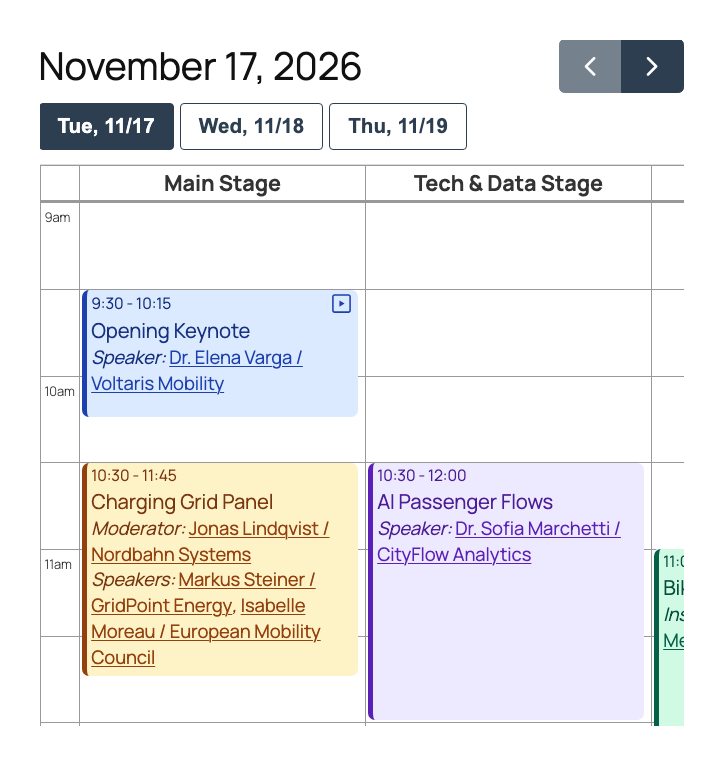
"What runs where, at the same time?" — stages side by side, time on the left, every session where it belongs. This is the format attendees expect from a serious congress, summit or trade-fair stage program.
Why that matters
Squeeze 80 sessions on 3 parallel stages into a date-based list and your attendees scroll, backtrack and miss sessions. The structure of the data — parallel tracks — must be the structure of the page.
Five things a congress program needs that a calendar doesn't have
- Parallel stage columns — every stage is a column in one time grid, so overlaps are visible instead of buried
- Day tabs — one labeled, localized tab per congress day, not a date picker
- Speaker profiles — speakers as first-class content with photo, role, bio and all of their sessions, linked from every session
- Search & filters inside the grid — attendees filter by topic or search a speaker and the grid updates in place
- Session videos — a recording per session, playable right in the program for hybrid events and post-event content
These aren't missing features of The Events Calendar — they're a different product. Its model (events, venues, organizers, dates) is simply built for a different job than a program model (stages, sessions, speakers, tracks).
Use both — they solve different problems
Many organizer websites run both: The Events Calendar for the "upcoming events" overview across the year, MultiStage Event Planner for the program page of the congress itself. They register separate content types and coexist without conflict.
Common questions
Is MultiStage Event Planner an alternative to The Events Calendar?
Only for one specific job: displaying a multi-track program with parallel stages. For event listings, recurring events, venues and ticketing, The Events Calendar remains a great choice. If your problem is "our congress program does not fit into a calendar", that is the job MultiStage Event Planner was built for.
Can both plugins run on the same WordPress site?
Yes. They register different post types and do not interfere. A common setup: The Events Calendar powers the "upcoming events" section of the site, while the congress program page renders with MultiStage Event Planner.
Can I migrate sessions from The Events Calendar?
There is no automated importer — the data models differ too much (events with dates vs. sessions on stages with speakers). A typical congress program with 50–150 sessions is entered in a few hours through the familiar WordPress admin, and agencies can script the import via WP-CLI.
See your program as a real schedule grid.
Free to start — used in production by BIM World MUNICH (150 sessions on 6 parallel stages).